Welcome to the Pycom forum Forum
    • \[\[global:header.categories\]\]
    • \[\[global:header.recent\]\]
    • \[\[global:header.tags\]\]
    • \[\[global:header.popular\]\]
    • Login
    1. Home
    2. Tags
    3. wlan wifi

    Explore Pybytes | Official Documentation | Report a Firmware Bug/Issue | GitHub

    Log in to post

    • All categories
    • D

      LoPy stuck in Station(STA) Mode!

      Watching Ignoring Scheduled Pinned Locked Moved LoPy lopy wlan wifi reset ssid ap mode
      3
      1 Votes
      3 Posts
      1k Views
      D
      @livius Thanks a lot. Now both of my LoPy works in AP mode. com port issue is adressed and fix will be released in next firmware @daniel can say when. I hope it is very soon.
    • R

      wipy-wlan-* does not work with key www.wipy.io

      Watching Ignoring Scheduled Pinned Locked Moved WiPy 2&3 wipy2.0 wlan wifi
      3
      0 Votes
      3 Posts
      1k Views
      R
      @robert-hh Thanks for the info ! www.pycom.io works and we can now join the network.
    • M

      Lopy-wlan not appearing after stoppinig mqtt example

      Watching Ignoring Scheduled Pinned Locked Moved LoPy wlan wifi wifi reset mqtt lopy-wlan
      5
      0 Votes
      5 Posts
      2k Views
      R
      @mkbenon You're welcome, I just gave you some hints, glad that you manage yourself (best learning method). :o) Also please note that MQTT example script changes WLAN antenna mode for external (WLAN.EXT_ANT). If your LoPy setup has the external antenna - that's OK, but if not you should use default internal antenna (WLAN.INT_ANT).
    • S

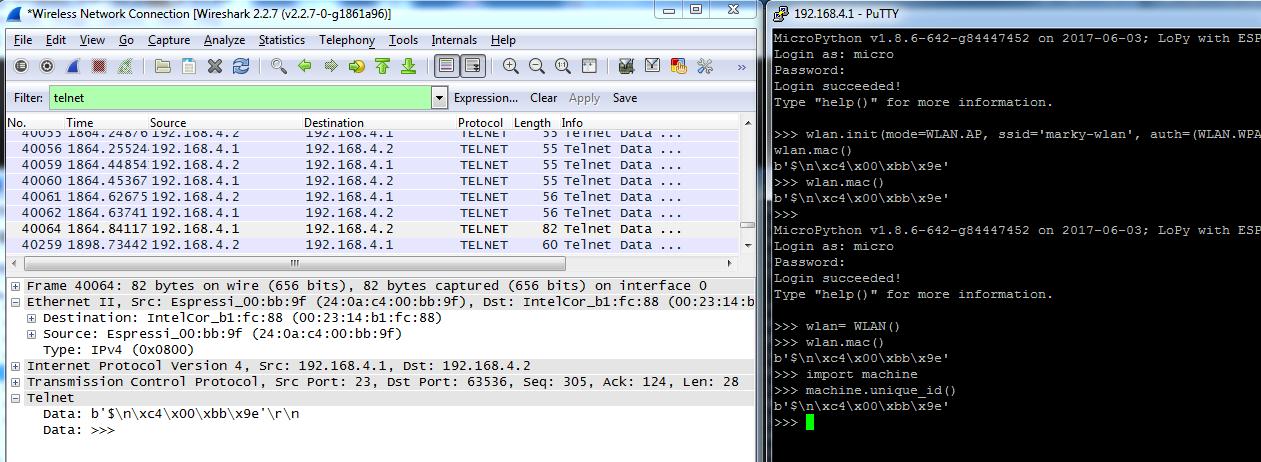
      WLAN.mac() & machine.unique_id() is not accurately reporting the unit wifi mac address

      Watching Ignoring Scheduled Pinned Locked Moved Issues & Bugs wlan wifi mac address machine.unique wlan.mac
      4
      1
      0 Votes
      4 Posts
      2k Views
      S
      @jmarcelino ok, thanks. The Lopy was in AP mode. I will give it a try in STA mode. Cheers Mark
    • 1 / 1